





Skip to content
  • JLR DOIP Enet to work with TOPIX 2026
  • Guide
  • Support
  • Newsletter

    Sign up for Newsletter

    Signup for our newsletter to get notified about sales and new products. Add any text here or remove it.

    [contact-form-7 id="7042" title="Newsletter Vertical"]
  • JLR DOIP Enet to work with TOPIX 2026
JLR EngineeringJLR Engineering
  • Login
  • Cart / $0.00 0
    • No products in the cart.

      Return to shop

  • 0
    Cart

    No products in the cart.

    Return to shop

  • Demo Software
  • JLR Engineering
  • OEM Activation
  • OEM Retrofits
  • Power Upgrade
JLR Enet Type C Cable
JLR Enet Type C Cable - Image 2
JLR Enet Type C Cable - Image 3
JLR Enet Type C Cable - Image 4
JLR Enet Type C Cable - Image 5
JLR Enet Type C Cable - Image 6
Home / JLR Enet

JLR Enet Type C Cable

  • X-obd Enet Cable

$49.00

SKU: JLRENTCB Category: JLR Enet Tags: Automotive Diagnostics, Diagnostics over IP, DOIP Diagnostics, Enterprise Security, Jaguar Land Rover, JET Master Compatible, JLR Coding Flashing, JLR DoIP Cable, JLR Enet Type C Cable, JLR Enet WiFi Adapter, JLR Pathfinder Proxy, Professional JLR Tool, Type-C Adapter, USB Type-C Diagnostic Cable, Workshop Grade
  • X-obd Enet Cable
Categories
  • Demo Software (9)
  • JLR Diagnostic (1)
  • JLR Enet (5)
  • JLR Engineering (8)
  • JLR Software (10)
  • OEM Activation (40)
  • OEM Retrofits (66)
  • OEM Spare Parts (1)
  • Power Upgrade (13)
  • Virginised EEPROM (26)
  • Description

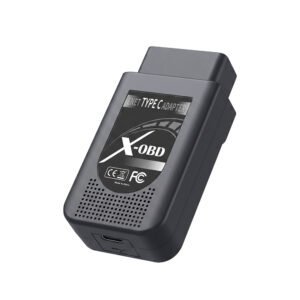
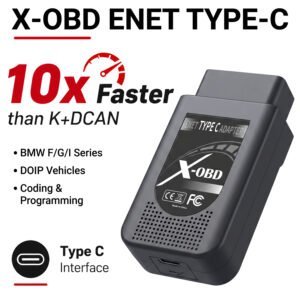
JLR Enet Type C Cable

📄 Product Description

The JLR Enet Type C Cable connects diagnostic tools to modern vehicle networks. A technician relies on the JLR Enet Type C Cable for fast, reliable DoIP data transfer. This cable features a rugged Type‑C connector on one end and a standard RJ45 Ethernet port on the other. Consequently, it bridges the workshop laptop to the vehicle’s OBD diagnostic gateway. The cable supports Gigabit Ethernet speeds for seamless module programming. Therefore, it reduces waiting times during firmware updates and coding sessions. Its durable construction ensures long‑lasting performance in busy workshop environments.
First, the technician plugs the Type‑C end into the laptop. After that, they connect the RJ45 end to the vehicle’s diagnostic port. Then they launch the diagnostic software and establish the link.
Subsequently, the cable provides a stable, high‑bandwidth connection. As a result, the technician performs online ECU flashing and live data streaming.

📡 High‑Speed Data Transfer

The cable supports Gigabit Ethernet for fast module communication. It handles large data packets during ECU reprogramming without delays. Furthermore, it maintains consistent throughput even under heavy load. Therefore, technicians complete programming jobs in minimal time. The cable also ensures error‑free transmission via its robust shielding.

🔌 Universal Connectivity

The Type‑C connector fits modern laptops and tablets seamlessly. It also works with USB‑C hubs and docking stations without issues. Moreover, the RJ45 end connects to standard vehicle diagnostic ports.
Consequently, the cable offers plug‑and‑play convenience for workshops. It requires no additional drivers or external power adapters.

🛡️ Durable and Reliable Construction

The cable features a tough, abrasion‑resistant outer jacket. It also includes reinforced strain relief at both connector ends. Furthermore, the internal wiring uses high‑quality copper conductors. As a result, it withstands frequent plugging and unplugging cycles. The cable’s shielding protects against electrical noise and interference.

✨ Key Features

Type‑C to RJ45 Ethernet cable for DoIP diagnostics. Supports Gigabit Ethernet speeds for fast data transfer. Shielded design minimises electromagnetic interference. Plug‑and‑play operation – no drivers required. Durable construction with reinforced strain relief. Compatible with all standard diagnostic software suites.

🖥️ System Requirements

The cable works with laptops and tablets that have a USB‑C port.
It requires a standard Ethernet diagnostic interface on the vehicle side.
Furthermore, it supports all major operating systems and diagnostic platforms.
Users should ensure their software recognises the Ethernet connection.
The cable does not require any additional power supply or external drivers.


Related products
Demo JLR CCF Tools 5.0 CCF Editor for JLR 2017-2026Alternative view of Demo JLR CCF Tools 5.0 CCF Editor for JLR 2017-2026
Quick View

Demo Software

Demo JLR CCF Tools 5.0 CCF Editor for JLR 2017-2026

$29.00
SX-CAN JLR Engineering Tool CAN Bus VehiclesAlternative view of SX-CAN JLR Engineering Tool CAN Bus Vehicles
Quick View

JLR Engineering

SX-CAN JLR Engineering Tool CAN Bus Vehicles

$1,889.00
Remote Installation JLR SDD Pathfinder V374 Offline 2023Alternative view of Remote Installation JLR SDD Pathfinder V374 Offline 2023
Quick View

JLR Software

Remote Installation JLR SDD Pathfinder V374 Offline 2023

$179.00
JLR CCF Tools 4.6 JLR CCF Editor for Pathfinder SDDAlternative view of JLR CCF Tools 4.6 JLR CCF Editor for Pathfinder SDD
Quick View

JLR Software

JLR CCF Tools 4.6 JLR CCF Editor for Pathfinder SDD

$69.00
JLR Enet WiFi Adapter Type-CAlternative view of JLR Enet WiFi Adapter Type-C
Quick View

JLR Enet

JLR Enet WiFi Adapter Type-C

$299.00
JLR Enet Type C Cable with Voltage DisplayAlternative view of JLR Enet Type C Cable with Voltage Display
Quick View

JLR Enet

JLR Enet Type C Cable with Voltage Display

$55.00
New JLR Pathfinder Offline 2023 Enhancement Full accessAlternative view of New JLR Pathfinder Offline 2023 Enhancement Full access
Quick View

JLR Software

New JLR Pathfinder Offline 2023 Enhancement Full access

$179.00
JET Pro JLR Engineering Tool with JLR Enet WiFi 2017-2024Alternative view of JET Pro JLR Engineering Tool with JLR Enet WiFi 2017-2024
Quick View

JLR Engineering

JET Pro JLR Engineering Tool with JLR Enet WiFi 2017-2024

$2,699.00
Visa
PayPal
Stripe
MasterCard
Cash On Delivery
Copyright 2026 © JLR Enginereing Solutions
  • Demo Software
  • JLR Engineering
  • OEM Activation
  • OEM Retrofits
  • Power Upgrade
  • Login
  • Newsletter

Login

Lost your password?