

Digital Speed Indicator
? Product Description
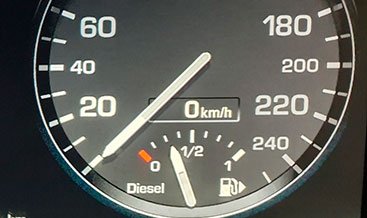
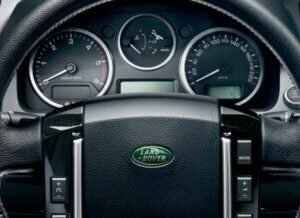
The Digital Speed Indicator provides drivers with an immediate, highly visible numerical speed readout on the instrument cluster. Most modern vehicles offer a Digital Speed Indicator as a standard feature or as an optional setting within the multi‑information display. This feature displays the vehicle’s current speed in large, easy‑to‑read numerals. Consequently, it eliminates the need to interpret the position of a traditional analog needle. The readout updates instantaneously, delivering real‑time speed information.
Moreover, the display supports both mph and km/h units with a simple setting change. A driver activates the Digital Speed Indicator through the instrument cluster menu. After that, they select the digital speed option from the available display layouts. Then the system shows the current speed in a prominent position on the screen. Subsequently, the readout updates continuously as the vehicle’s speed changes. As a result, the driver always sees their exact speed at a glance.
? Activation and Display Access
Drivers access the Digital Speed Indicator through the instrument cluster settings. They can usually toggle it on or off using steering wheel controls. Furthermore, they can choose between mph and km/h units easily. Consequently, the speed readout appears in a prominent display zone. The setting remains saved even after turning the ignition off.
? Display Customization and Readability
Some systems allow drivers to change the font size and color. They can also reposition the readout within the display area. Moreover, the system automatically adjusts brightness for daylight and nighttime.
As a result, the readout remains clearly visible in all lighting conditions. The display uses high‑contrast numerals for maximum legibility.
⚡ Integration with Other Safety Systems
The Digital Speed Indicator works seamlessly with speed limit assist systems. It can flash or change color when the driver exceeds the posted limit. Furthermore, it integrates with adaptive cruise control to show the set speed. Consequently, drivers can compare their actual speed against the target. The system also supports digital speed display in head‑up display (HUD) units.
✨ Key Features
- Instantaneous digital speed readout in mph or km/h.
- Customizable display position and appearance.
- Automatic brightness adjustment for day/night driving.
- Integration with speed limit assist and cruise control.
- High‑contrast numerals for excellent visibility.
- Compatible with both analog and digital instrument clusters.
- Simple on/off toggle via steering wheel controls.
? Requirements
The vehicle must have a digital instrument cluster or multi‑information display.It requires the appropriate software settings enabled in the instrument module. Furthermore, the steering wheel controls must support menu navigation. Most vehicles manufactured after 2010 include this feature. Some entry‑level models may require activation via diagnostic tools.
| Car Model | Range Rover 2010-2012 |
|---|
Related products
OEM Activation
OEM Activation
OEM Activation
OEM Activation
OEM Activation
OEM Activation
OEM Activation
OEM Activation