
Language Change on Instrument Cluster
? Product Description
Many drivers accidentally change their instrument cluster language and struggle to restore it. Language change on instrument cluster</strong> provides a simple solution to switch back to a familiar display.
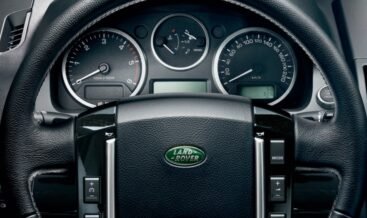
A driver performs a language change on instrument cluster through the vehicle’s settings menu. This process updates all text displays, including warnings, fuel economy, and trip computer data. Consequently, the driver understands all dashboard information clearly and confidently. The system supports multiple languages, including English, Spanish, French, and German. Moreover, the change occurs instantly without affecting any other vehicle functions.
First, the driver accesses the settings menu via the steering wheel controls. After that, they navigate to the display or language submenu. Then they scroll through the available language options. Subsequently, they select the desired language and confirm the choice. As a result, the instrument cluster updates all text immediately. The driver does not need to restart the vehicle for the change to take effect. Furthermore, the setting remains saved even after turning off the ignition.
? Steering Wheel and Menu Controls
Drivers use the steering wheel buttons to navigate the instrument cluster menu. They press the menu or OK button to access the settings. Furthermore, they scroll up or down to find the language option.
Consequently, they locate the setting without taking their eyes off the road. The controls are intuitive and respond immediately to inputs.
? Available Language Options
The system typically includes English, Spanish, French, German, and Italian. Some vehicles also offer Portuguese, Dutch, Russian, and Chinese. Moreover, the list may vary depending on the vehicle’s market region. As a result, most drivers find their preferred language available. The system displays all options clearly on the screen.
? Integration with Infotainment System
In many vehicles, the instrument cluster language syncs with the infotainment system. Changing one automatically updates the other for consistency. Furthermore, the driver can set separate languages for each system if desired. Consequently, the driver enjoys a fully personalized cockpit experience. The setting also affects voice command responses and navigation prompts.
✨ Key Features
- Change the instrument cluster display language instantly.
- Supports multiple languages, including English, Spanish, French, and more.
- Simple navigation via steering wheel controls.
- No vehicle restart required – changes take effect immediately.
- Integrates with infotainment system language settings.
- Retains the language selection after ignition off.
- Enhances driver understanding of warnings and information.
? Compatibility
This feature is available on most vehicles with a digital or multi‑information instrument cluster.
It works with both analog‑style and fully digital displays.
Furthermore, the menu structure may vary slightly between brands and models.
Most vehicles manufactured after 2010 include this capability.
Entry‑level models may require a software update to unlock all language options.
| Car Model | Freelander 2 2006-2014 |
|---|
Related products
OEM Activation
OEM Activation
OEM Activation
OEM Activation

OEM Activation
OEM Activation
OEM Activation

OEM Activation