

InControl Touch Pro 10 display
Intuitive User Interface and Home Screen
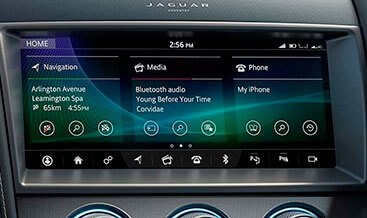
The InControl Touch Pro 10 display features a 10-inch high-definition capacitive touchscreen as the central command hub. This InControl Touch Pro 10 display offers a fully customizable home screen for instant access to preferred apps. Consequently, this allows drivers to arrange icons exactly as they desire. The interface responds to pinch, swipe, and tap gestures with zero lag. Users can create multiple pages for different driving scenarios. The system saves these layouts to individual driver profiles automatically. The screen’s anti-glare coating ensures perfect readability in direct sunlight. Furthermore, the display supports split-screen functionality for multitasking efficiency. This allows navigation and media controls to remain visible simultaneously.
Seamless Smartphone Integration and Connectivity
The InControl Touch Pro 10 display integrates smoothly with Apple CarPlay and Android Auto. It connects wirelessly to smartphones without requiring physical cables. The system also supports Bluetooth streaming for audio and hands-free calls. Moreover, the display pairs with the vehicle’s Wi-Fi hotspot capability. Passengers can access internet services directly through the screen interface. It includes dual USB ports for device charging. It also supports HDMI input for external media players. The system automatically adjusts screen orientation based on the active app. This flexibility enhances the overall user experience significantly.
Intelligent Navigation with Real-Time Updates
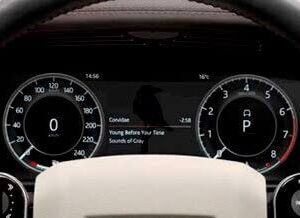
The InControl Touch Pro 10 display incorporates a sophisticated satellite navigation system. It receives over-the-air map updates for current road information. The system also shows real-time traffic data and incident alerts. It suggests alternative routes to avoid congestion automatically. The display presents junction views and lane guidance for complex intersections. Furthermore, it integrates with the Interactive Driver Display. It sends turn-by-turn directions to the instrument cluster screen. This reduces the need for constant dashboard glances. The system also includes off-road navigation for adventurous routes. It records waypoints and tracks for future reference.
Voice Control and Natural Language Commands
The InControl Touch Pro 10 display responds to voice commands for hands-free operation. Drivers activate the system with a simple wake word or steering wheel button. The system understands natural language for destination entry and media selection. Users can say “I’m hungry” to find nearby restaurants. The system then displays results with ratings and opening hours. It also reads incoming messages aloud and allows voice replies. The voice control adjusts climate settings and seat functions seamlessly. It learns user preferences over time. It improves recognition accuracy through continued use. This functionality minimizes driver distraction significantly.
Vehicle Settings and Remote Functions
It provides comprehensive access to vehicle configurations. Users adjust lighting, locking, and climate preferences through the menu system. The screen also displays real-time tire pressure and fuel consumption data. It provides maintenance reminders and diagnostic information for technicians. Furthermore, it supports remote functions via the companion app. Owners can lock/unlock doors, start the engine, or check battery status remotely. The system sends alerts for security events or service intervals. The display also shows charging status for electric and hybrid vehicles. Ultimately, it serves as the digital command center. It makes every journey more connected, informed, and enjoyable. The technology transforms how drivers interact with their vehicle.
| Car Model | F-TYPE 2014+ |
|---|
Related products
OEM Retrofits
OEM Retrofits

OEM Retrofits
OEM Retrofits
OEM Retrofits
OEM Retrofits
OEM Retrofits
OEM Retrofits